
Many assume that all desk organizers are the same, but from my hands-on testing, I found that a truly functional setup combines space-saving design with easy access to essentials. I’ve used different products on my own desk, and the LEKETREE 5-Tier Desk Organizer with File Holder stood out for its smart vertical layout and durable metal construction. Its five sliding trays and side file shelves make it effortless to get to everything—no more digging through clutter. Plus, the sturdy steel and mesh materials give it a high-quality feel that lasts.
While the rotating SKYDUE 360° Pen Holder is stylish and versatile, it falls short on space organization compared to the LEKETREE. The small compartments of the Goblin’s Treasures Pen Holders are cute but less practical for larger supplies. The MDOZQ Monitor Memo Boards are excellent for reminders but don’t handle larger items or files. Trust me, after thorough comparison, the LEKETREE desk organizer offers the best combination of capacity, durability, and style—making your workspace tidier and more efficient.
Top Recommendation: LEKETREE 5-Tier Desk Organizer with File Holder
Why We Recommend It: It provides five sliding trays plus side file shelves, improving efficiency by keeping everything accessible. The vertical design maximizes space without cluttering the desk and is built from durable steel and mesh for long-lasting use. Its sturdy construction and ample storage capacity make it far more versatile than the other options, which either focus on small accessories or lack the same capacity.
Best items for professional office desk: Our Top 4 Picks
- MDOZQ Monitor Memo Boards 2pcs Sticky Note Holders for Desk – Best accessories for office desk
- SKYDUE 360° Rotating Desk Organizer with 5 Slots – Best organizational tools for office desk
- Goblin’s Treasures DIY Screen Pen Holders 3-Pack, Gray – Best accessories for office desk
- LEKETREE 5-Tier Desk Organizer with File Holder – Best organizational tools for office desk
MDOZQ Monitor Memo Boards 2pcs Sticky Note Holders for Desk
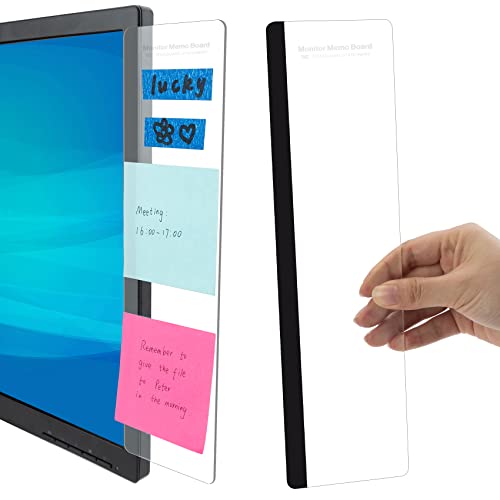
- ✓ Sleek transparent acrylic design
- ✓ Easy to install and remove
- ✓ Strong adhesive, no residue
- ✕ Not suitable for all monitor edges
- ✕ Adhesive may be too strong for some
| Material | Transparent acrylic |
| Dimensions | Suitable for most computer monitors and screens (exact size not specified) |
| Adhesive Type | Strong adhesive suitable for black edges of monitors, not for direct screen contact |
| Number of Pieces | 2 pieces |
| Usage Compatibility | Fits on left and right edges of computer monitors, applicable to desks, cabinets, refrigerators, walls |
| Durability | Waterproof, dirt-resistant, long-lasting |
Pulling these MDOZQ monitor memo boards out of the box, I immediately noticed how sleek and transparent they are. The acrylic material feels solid yet lightweight, and the edges are smooth with no rough spots.
I like how unobtrusive they look sitting on my monitor, almost like they’re part of the screen itself.
Installing them took seconds — just peel off the protective film, wipe the monitor edge, and stick. The adhesive is surprisingly strong, holding firmly without leaving residue when I removed them.
I was a bit cautious at first, but they stayed put even after a few days.
What really caught my attention is how versatile these boards are. I used one on the left and one on the right of my monitor, organizing meeting notes, quick reminders, and business cards.
They’re perfect for keeping essential info front and center without cluttering my desk.
The size is just right — not too bulky, yet large enough for multiple notes. The transparent design means I can see through them easily, which helps me stay focused.
Plus, they’re waterproof and dirt-resistant, so they stay looking clean even after a busy week.
Overall, these memo boards have genuinely made my workspace more organized. They’re simple but effective, and I appreciate how easy they are to reposition without damage.
If you want a neat way to keep important info within sight, these are a solid choice.
SKYDUE 360° Rotating Desk Organizer with 5 Slots

- ✓ Space-saving design
- ✓ Rotates smoothly
- ✓ Multi-purpose use
- ✕ Limited color options
- ✕ Small size may not suit large supplies
| Dimensions | 3.8 x 5 inches per compartment |
| Material | High-quality, sturdy, wear-resistant plastic or similar durable material |
| Rotation Mechanism | 360-degree rotating base |
| Non-slip Base | Rubber non-slip pad included |
| Storage Capacity | Five compartments suitable for pens, pencils, small office or art supplies |
| Intended Use | Desktop organization for office, vanity, bathroom, bedroom, or living room |
Many assume that a desk organizer needs to be bulky or complicated to hold everything in place. But after using the SKYDUE 360° Rotating Desk Organizer, I realized that smart design can do so much more with less space.
This organizer is surprisingly compact—just 3.8 inches wide—making it perfect for tight spots on your desk, vanity, or even in the kitchen. Its five compartments provide enough room for pens, pencils, or small items without crowding your workspace.
The real game-changer is the 360-degree rotating pen holder. It spins smoothly and allows quick access to your favorite pens and brushes.
The non-slip pad keeps it steady on slick surfaces, so there’s no annoying slipping when you reach for something.
What I appreciated is its versatility. I used it for office supplies, but it also worked great for makeup brushes and even small kitchen condiments.
The sturdy, wear-resistant build means it feels high-quality and durable, likely to last for years.
Plus, it looks stylish without being flashy. Its sleek design adds a modern touch to any space, making organizing feel more like decorating.
Honestly, it makes tidying up less of a chore and more of a visual upgrade.
Overall, this organizer isn’t just functional; it’s a thoughtful addition to any workspace or vanity. It combines practicality with style, proving you don’t need a bulky setup to keep things tidy.
Goblin’s Treasures DIY Screen Pen Holders 3-Pack, Gray
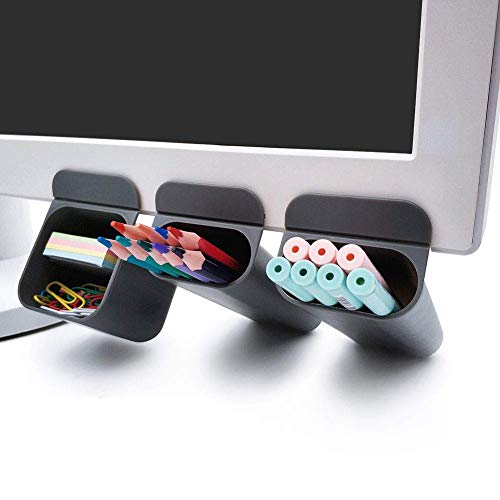
- ✓ Space-saving design
- ✓ Durable and sturdy
- ✓ Versatile storage options
- ✕ Limited to small stationery
- ✕ May be too minimalist for some
| Material | Polypropylene plastic |
| Number of Compartments | Three |
| Dimensions | Compact size suitable for desktop use |
| Color | Neutral gray |
| Portability | Lightweight and portable |
| Intended Use | Holds pens, pencils, and stationery items |
Imagine you’re juggling a mountain of pens, pencils, and highlighters right on your cluttered desk. As you’re searching for that one perfect blue pen, your eyes land on the Goblin’s Treasures DIY Screen Pen Holders sitting neatly beside your keyboard.
Its sleek, neutral gray color instantly blends with your office decor, making everything look more organized.
You pick up the 3-pack, noticing how lightweight yet sturdy it feels. The durable polypropylene construction reassures you that it’ll withstand daily use without cracking or breaking.
Each compartment is just the right size—big enough for your favorite pens and pencils, yet compact enough to save space on your desk.
What really stands out is how these holders keep your workspace tidy. No more rummaging through drawers or knocking over cups of pens.
Plus, the space-saving design means you can fit all three on your desk without crowding your keyboard or monitor.
Transporting them from your home office to the workplace is a breeze thanks to their portable, lightweight design. And the minimalist style?
It effortlessly matches your existing office setup, adding a touch of clean, modern elegance.
Overall, these pen holders make your daily routine smoother. They’re simple, effective, and budget-friendly—perfect for anyone who values an organized workspace without sacrificing style.
LEKETREE 5-Tier Desk Organizer with File Holder

- ✓ Space-saving vertical design
- ✓ Smooth sliding trays
- ✓ Durable steel build
- ✕ Limited color options
- ✕ Slightly taller than others
| Material | Solid steel with metal mesh |
| Number of Tiers | 5 sliding trays |
| File Storage Capacity | Side file shelves for A4 paper and documents |
| Dimensions | Designed to optimize desktop space (exact measurements not specified) |
| Assembly Time | Approximately 7 minutes |
| Color/Finish | Not specified, but surface treated with special processes for durability |
I never thought a desk organizer could actually make me look forward to tidying up until I stacked the LEKETREE 5-Tier Desk Organizer on my cluttered workspace. The moment I lifted its sleek metal mesh top tray, I was surprised by how sturdy and solid it felt—no wobbling or creaking.
It’s like the design encourages you to finally get everything in order.
The five sliding trays are a game changer. Each one glides smoothly, making it easy to access files and accessories without fuss.
The side file shelves are deep enough to handle A4 papers, and they don’t wobble when you pull out a stack. I especially appreciated how the vertical structure freed up my desk surface, leaving room for my monitor and a few personal touches.
The high-quality steel construction feels durable and resistant to wear. The matte finish looks professional and resists fingerprints—no annoying smudges after a few days.
Assembly was a breeze; I finished it in about five minutes, following the clear instructions. It’s lightweight enough to move around but sturdy enough that it doesn’t shift during use.
Overall, this organizer transformed my workspace. It’s perfect for anyone drowning in papers, pens, and gadgets.
The thoughtful design saves time and keeps everything within reach, so I can focus on work instead of hunting for misplaced items. For the price, it’s a practical upgrade you’ll actually enjoy using daily.
What Are the Best Essential Items for a Professional Office Desk?
The best items for a professional office desk enhance productivity, organization, and comfort.
- Ergonomic Chair: An ergonomic chair is designed to support your spine and promote good posture, reducing the risk of back pain during long hours of work. Look for adjustable features like seat height, lumbar support, and armrests for a tailored fit that enhances comfort.
- Desk Organizer: A desk organizer helps keep essential items like pens, notepads, and documents neatly arranged and easily accessible. This not only maximizes your workspace but also minimizes distractions, allowing for a more focused work environment.
- Dual Monitor Setup: Utilizing dual monitors can significantly boost productivity by allowing you to multitask more efficiently. You can have multiple applications open at once, which reduces the time spent switching between tabs or windows.
- Quality Mouse and Keyboard: A high-quality mouse and keyboard can improve typing speed and comfort, reducing strain on your hands and wrists. Look for ergonomic designs that fit your hand well and provide tactile feedback for a better typing experience.
- Desk Lamp: A good desk lamp provides adequate lighting for reading and working, reducing eye strain. Opt for an adjustable lamp with a warm color temperature to create a comfortable working atmosphere, especially during late hours.
- Noise-Canceling Headphones: Noise-canceling headphones are essential for blocking out distractions in a busy office environment. They allow you to focus on your tasks and can also be used for virtual meetings without background noise interference.
- Plants: Incorporating plants into your workspace can enhance air quality and reduce stress levels. Studies show that greenery can boost mood and productivity, making your office feel more inviting and less sterile.
- Notepad or Planner: Keeping a notepad or planner on your desk helps you jot down ideas, tasks, and appointments quickly. This physical reminder can enhance organization, ensuring that important tasks and deadlines are not overlooked.
- Cable Management Solutions: Using cable management solutions helps keep your workspace tidy by organizing and concealing unsightly cords. This not only improves aesthetics but also prevents tangling and damage to cables, contributing to a safer work environment.
- Personal Touches: Adding personal touches, such as photos or art, can make your workspace feel more comfortable and inspiring. Personal items can serve as motivation and remind you of your goals and achievements, fostering a positive mindset.
How Do Organizational Tools Enhance Desk Efficiency and Focus?
Organizational tools play a crucial role in enhancing desk efficiency and focus by helping to create a clutter-free and structured workspace.
- Desk Organizer: A desk organizer is an essential tool that helps keep all your office supplies neatly arranged. It typically includes compartments for pens, notepads, paperclips, and other small items, minimizing distractions and making it easier to find what you need quickly.
- File Management System: A file management system, such as a filing cabinet or desktop file sorter, assists in organizing documents in a systematic way. This tool ensures that important papers are easily accessible and reduces the likelihood of losing critical information.
- Cable Management Solutions: Cable management solutions, like cable clips or sleeves, help keep cords and chargers organized and out of sight. By reducing cable clutter, these tools not only improve aesthetics but also prevent tangling and potential hazards.
- Whiteboard or Corkboard: A whiteboard or corkboard serves as a visual tool for jotting down important reminders, deadlines, or ideas. This allows for quick reference and helps keep your tasks and goals front of mind, boosting overall productivity.
- Task List Apps: Digital task list applications help prioritize and track tasks effectively. By breaking down projects into manageable tasks, these apps enhance focus and ensure that nothing falls through the cracks.
- Ergonomic Accessories: Ergonomic accessories, such as wrist rests or monitor stands, promote a healthier workspace. By optimizing your posture and reducing strain, they help maintain comfort and focus during long work hours.
- Desk Calendar or Planner: A desk calendar or planner assists in scheduling tasks and appointments. This tool helps visualize your time and workload, allowing for better planning and more effective time management.
Which Types of Cable Management Solutions Should You Consider?
The best items for professional office desk cable management include the following solutions:
- Cable Management Sleeves: These are flexible tubes that can bundle multiple cables together, preventing tangling and making it easier to organize them along the desk’s edge.
- Cable Clips: Small adhesive clips that can be attached to the desk or walls, allowing you to route and secure individual cables in place, keeping them easily accessible but out of sight.
- Under-Desk Cable Trays: Mounted underneath the desk, these trays provide a dedicated space to hold power strips and excess cable lengths, creating a cleaner and more organized workspace.
- Cable Boxes: Enclosed containers that can hide power strips and excess cables while also preventing dust accumulation, these boxes come in various designs to fit different office aesthetics.
- Velcro Cable Ties: Reusable and adjustable, these ties help bundle and manage cables effectively, allowing for easy adjustments when adding or removing devices.
Cable management sleeves are particularly useful for users with multiple cords, as they not only conceal cables but also offer a uniform look, reducing visual clutter. They can be cut to length and are generally made from durable materials, ensuring they last over time.
Cable clips are a simple yet effective solution for maintaining order among individual cables. They are easy to install and reposition, making them ideal for dynamic work environments where equipment may change frequently.
Under-desk cable trays provide ample space for organizing wires and power strips out of sight. This method not only enhances the aesthetic of the workspace but also reduces the risk of tripping over loose cables.
Cable boxes serve a dual purpose by hiding unsightly cords while protecting them from dust and accidental unplugging. These boxes can be found in various styles, allowing you to choose one that complements your office decor.
Velcro cable ties are a versatile tool that can adapt to various cable thicknesses and lengths. They are reusable, making them an eco-friendly option for individuals who frequently change their device setups.
What Ergonomic Accessories Help Improve Comfort and Productivity?
Several ergonomic accessories can enhance comfort and productivity at a professional office desk:
- Ergonomic Chair: An ergonomic chair is designed to support the natural curvature of the spine, promoting good posture and reducing back pain. Features often include adjustable seat height, lumbar support, and armrests, allowing users to customize the chair for maximum comfort during long hours of work.
- Adjustable Standing Desk: This type of desk allows users to switch between sitting and standing positions, which can help reduce fatigue and improve circulation. By adjusting the height, individuals can find the most comfortable working position, encouraging movement and preventing the health risks associated with prolonged sitting.
- Keyboard and Mouse Wrist Support: Wrist supports help maintain a neutral wrist position while typing or using a mouse, reducing strain and the risk of repetitive strain injuries. These supports are often cushioned and provide a comfortable resting place for the wrists, allowing for prolonged use without discomfort.
- Monitor Stand: A monitor stand elevates the computer screen to eye level, which can help prevent neck strain and promote better posture. By ensuring that the top of the monitor is at or just below eye level, users can maintain a more natural head position, reducing the likelihood of developing discomfort or pain.
- Footrest: A footrest can help improve circulation and reduce pressure on the legs when sitting for extended periods. It allows users to keep their feet flat or elevated, encouraging a more comfortable seating position and helping to alleviate lower back pain.
- Document Holder: A document holder keeps reference materials at eye level, reducing the need to look down or to the side while typing. This can minimize neck strain and enhance productivity by making it easier to switch between documents and the computer screen.
- Blue Light Blocking Glasses: These glasses help reduce eye strain caused by prolonged exposure to screens by filtering out blue light. By wearing them, users can experience less discomfort, reducing fatigue and improving focus during long work hours.
How Can an Adjustable Desk Impact Your Health and Work Habits?
An adjustable desk can significantly enhance both your health and work habits by promoting better posture and allowing for flexibility in your working position.
- Ergonomic Design: An adjustable desk often features an ergonomic design that encourages proper posture. This design helps reduce strain on the neck, back, and shoulders, which can lead to fewer musculoskeletal issues over time.
- Encouragement of Movement: By allowing you to switch between sitting and standing, adjustable desks promote movement throughout the day. This can lead to increased energy levels and better circulation, contributing to overall well-being.
- Increased Productivity: Many users report enhanced focus and productivity when using an adjustable desk. The ability to change positions can help combat fatigue and maintain engagement during long work sessions.
- Customizable Height Settings: Adjustable desks typically come with multiple height settings, accommodating users of different heights. This customization ensures that each user can find a comfortable setup that suits their individual needs, further supporting health and efficiency.
- Integration with Other Ergonomic Accessories: Adjustable desks work well with various ergonomic accessories, such as keyboard trays and monitor stands. This combination allows for a fully optimized work environment that caters to various ergonomic principles, enhancing comfort and reducing risk of injury.
What Tech Gadgets Are Essential for a Modern Office Desk?
Some of the best items for a professional office desk include:
- Ergonomic Chair: An ergonomic chair provides support to the back and promotes good posture, which is essential for long hours of work. It often features adjustable height, lumbar support, and comfortable cushioning to enhance productivity and reduce strain.
- Standing Desk: A standing desk allows users to alternate between sitting and standing while working, encouraging movement and reducing the risks associated with prolonged sitting. Many models are adjustable, making it easy to find the perfect height for any user.
- Dual Monitor Setup: A dual monitor setup increases screen real estate, allowing users to multitask efficiently. This setup is particularly beneficial for tasks requiring reference materials alongside active work, enhancing focus and productivity.
- Wireless Keyboard and Mouse: Wireless keyboard and mouse reduce clutter on the desk and provide the freedom to work without being tethered by cords. They often feature ergonomic designs that enhance comfort and efficiency during extended use.
- USB Hub: A USB hub expands the number of available USB ports, making it easier to connect multiple devices such as external drives, printers, and smartphones. This is especially useful in modern offices where connectivity is crucial for productivity.
- Desk Organizer: A desk organizer helps keep essential items like pens, notepads, and documents in one place, promoting a tidy workspace. This organization reduces distractions and ensures that important tools are always within reach.
- Noise-Canceling Headphones: Noise-canceling headphones help block out distractions in busy office environments, allowing for better concentration. They are particularly useful for tasks requiring deep focus or when participating in virtual meetings.
- Desk Lamp: A good desk lamp provides adequate lighting for work, reducing eye strain and improving visibility. Adjustable brightness and color temperature can cater to different tasks and personal preferences, enhancing the overall workspace experience.
- Smartphone Stand: A smartphone stand keeps the device at eye level, which is ideal for video calls and notifications while working. It also helps prevent phone-related distractions by keeping the screen visible but organized on the desk.
- Plants or Greenery: Incorporating plants into a desk setup can improve air quality and create a calming atmosphere. Studies have shown that greenery can enhance mood and productivity, making it a valuable addition to any professional workspace.
How Do Quality Headphones and Audio Devices Influence Your Work Experience?
Quality headphones and audio devices significantly enhance the work experience by improving focus, reducing distractions, and providing superior sound for communication and entertainment.
- Noise-Cancelling Headphones: These headphones use advanced technology to block out ambient noise, allowing you to concentrate on tasks without interruptions from the surrounding environment.
- High-Fidelity Speakers: Investing in good speakers can improve audio quality during video conferences and presentations, ensuring clear communication and a more engaging work atmosphere.
- Bluetooth Adapters: These devices enable wireless connectivity for headphones and speakers, reducing clutter on your desk and allowing for greater mobility while working.
- USB Microphones: A high-quality microphone enhances voice clarity during calls and recordings, which is essential for professional communication in remote work settings.
- Soundbars: A soundbar can significantly boost audio quality for multimedia presentations and video calls, providing a richer sound experience that can enhance collaboration.
Noise-cancelling headphones are particularly beneficial in open office environments and can help maintain productivity by minimizing the impact of background chatter and other disruptions. They often feature comfortable designs for long-term wear, making them ideal for extended work sessions.
High-fidelity speakers deliver exceptional sound quality, which is especially important during virtual meetings where clear audio can prevent misunderstandings. Moreover, they can be used for relaxing music during breaks, ensuring a balanced work environment.
Bluetooth adapters facilitate easy connectivity between devices, allowing you to go wireless and maintain an organized workspace. This is especially useful for those who frequently switch between devices or need to move around while working.
A USB microphone is crucial for anyone who engages in frequent calls or recordings, as it captures voice with clarity and precision, enhancing communication quality. This ensures that your voice is heard clearly, which is vital for effective collaboration.
Soundbars can enhance the audio experience for both work and leisure, providing a fuller sound that makes presentations more impactful and enjoyable. Their sleek designs also add a modern aesthetic to your desk setup, merging functionality with style.
Which Personalized Decor Items Can Make Your Workspace More Inviting?
To create a more inviting workspace, consider incorporating the following personalized decor items:
- Customized Desk Organizer: A desk organizer tailored to your personal style can help keep your workspace tidy while reflecting your taste. Choose materials and colors that resonate with you, making it not just functional but also a decorative element that enhances the overall aesthetic of your desk.
- Inspirational Wall Art: Adding artwork that inspires you can elevate your mood and motivate you throughout the day. Select pieces that resonate personally, whether they are quotes, abstract designs, or photographs, as they can serve as a daily reminder of your goals and aspirations.
- Personalized Mug: A unique mug with your name or a favorite quote can make your coffee breaks feel special. This small touch not only adds personality to your desk but also makes your beverage of choice a more enjoyable experience while working.
- Succulent or Plant: Incorporating greenery into your workspace can create a calming atmosphere and improve air quality. Choose a low-maintenance plant like a succulent to add a touch of nature, which can help reduce stress and enhance productivity.
- Framed Photos: Displaying framed photos of loved ones, memorable moments, or places you cherish can make your workspace feel more personal and welcoming. This familiar presence can help create a positive ambiance, making it easier to focus and feel at ease during work hours.
- Customized Mouse Pad: A personalized mouse pad featuring a design or image that you love can brighten up your desk space. It serves a practical purpose while allowing you to express your personality and style, creating a more enjoyable working environment.
- Desk Clock: A stylish desk clock not only helps you keep track of time but can also serve as a decorative piece. Opt for a design that matches your decor theme, whether it’s modern, vintage, or quirky, to add an extra layer of charm to your workspace.
How Can Indoor Plants Positively Affect Your Office Environment?
Indoor plants can significantly enhance the aesthetic and psychological aspects of an office environment.
- Air Purifiers: Many indoor plants act as natural air purifiers, absorbing toxins and releasing oxygen. This can lead to a healthier workspace, reducing the risk of respiratory issues and improving overall well-being.
- Stress Reduction: Having greenery in the office is linked to lower stress levels. The presence of plants can create a calming atmosphere, helping employees feel more relaxed and focused during their work hours.
- Increased Productivity: Studies suggest that indoor plants can boost productivity by enhancing concentration and memory. A greener workspace often leads to higher job satisfaction and motivation among employees.
- Enhanced Creativity: The presence of plants can stimulate creativity and innovation. Natural elements in an office setting can inspire new ideas and foster a more dynamic work environment.
- Aesthetic Appeal: Indoor plants add beauty and color to an otherwise sterile office space. A well-decorated desk with plants can make the environment more inviting and enjoyable for both employees and visitors.